
Satellite / Cable / Terrestrial Television Viewer - TV Recorder software for Windows tuner devices

Supported brands/models:
- TBS
- Genpix
- Twinhan
- Pinnacle
- Broadlogic
- DVB World
- Tongshi
- Prof
- Tevii
- Technisat
- Technotrend
- KNC
- NetUP
- Avermedia
- Anysee
- Compro
- Conexant
- FireDTV
- Hauppauge
- Omicom
- Nova
- Videomate
- QBox
- TT Budget
- Mystique SaTiX
- Azurewave
- Terratec
- Cinergy
- B2C2/Skystar
- CdvbAny
- All BDA devices
- and many others...
Test your device with our trial version to make sure, or search forum. We recommend "Genpix" for USA/Canada users and "TBS" cards for Europe & the other parts of the world if you will buy a new one!


DVB Dream has been regulary tested on these devices:
All BDA Compatible Devices (Genpix, TBS (Turbosight), FireDTV, Terratec Cinergy, KNC1, Compro VideoMate S350, Twinhan, Anysee, AMX, AverMedia, DVB World, Hauppauge, NetUP, Geniatech, Omicom, TechnoTrend, SkyStar HD, SkyStar HD2, Tevii and others...) DVBWorld/ SatStar2/ Nextorm/Acorp TV878DS USB/PCI) B2C2 (Airstar, Skystar2, Cablestar) SmartVision/Coship CdvbAny2030s Pinnacle PCTV Sat/Lite/400i Genpix Turbo-8PSK to USB device Twinhan (On WDM drivers, all BT 878 PCI cards should work *) Broadlogic - BL2030 Tongshi DVB-S cards/boxes Technotrend TT-budget 3200 Tevii S630, S660 and others

Devices tested by users
List of older tested devices
BDA tuner filter names


DVB Dream Guides

Windows TV tuner use cases, setup guides and recording workflows

DVB Dream guides

DVB Dream guides explain how to watch TV on a Windows computer, record satellite or terrestrial broadcasts, choose tuner software, and build reliable TV capture workflows with supported DVB, ATSC and ISDB-T hardware.

watch TV on computer

How to Watch TV on a Computer with a DVB Tuner

Learn how to watch TV on a Windows computer with DVB Dream, a DVB tuner card or USB stick, antenna or cable feed, channel scan, EPG and recording tools.

Read guide
record satellite TV on PC

How to Record Satellite TV on a PC

Use DVB Dream to record satellite TV on a Windows PC with DVB-S or DVB-S2 tuner hardware, scheduled recordings, transport stream capture and channel management.

Read guide
best DVB software for Windows tuners

How to Choose DVB Software for Windows Tuner Cards

Compare DVB software for Windows tuner cards by hardware support, BDA compatibility, recording features, EPG, scheduler, plugins, device setup and long-term reliability.

Read guide
multi channel TV recording software

Multi-Channel TV Recording Workflow for Monitoring Teams

Plan a multi-channel TV recording workflow with DVB Dream for broadcast monitoring, compliance capture, research archives, newsrooms and source footage review.

Read guide
record TV footage for YouTube

TV Footage Workflows for YouTubers and Creators

DVB Dream helps YouTubers, influencers and media teams record TV broadcasts, monitor regional channels and build source footage libraries for editing and research.

Read guide
Common DVB Dream Research Paths


Features:

- Multi PIP (19+1, watch a few channels at the same time)
- Multi recording (record more than 1 channel at the same time)
- UHD(4K)/HEVC support - HD/H264 support
- Timeshift
- LAN support
- VLC or MPC Integration
- Auto-zap
- Unique channel list system
(grouping/ordering by several flexible options)
- Favorite channels
- Quick Favorites
- Child lock
- Embedded aspect ratio modes
- Cropping / Zoom
- Sleep timer
- Record timer
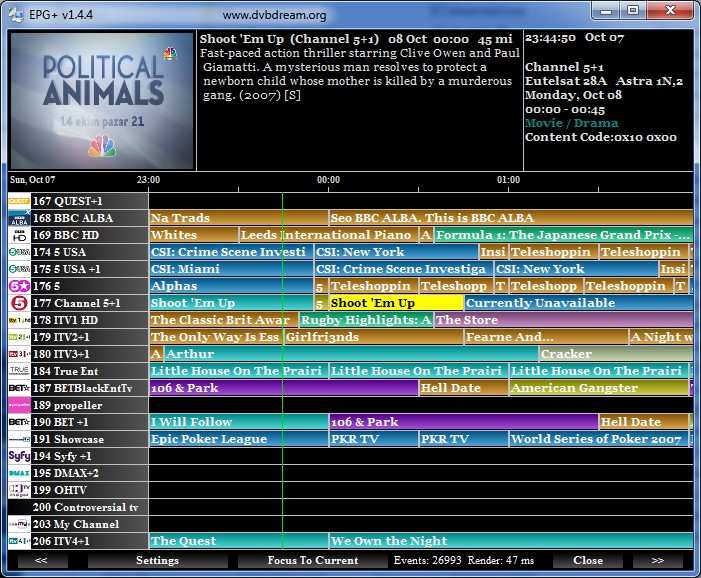
- EPG
- OSD
- Scheduler
- Render-less mode
- Internal graph building
- Multi monitor support
- Command line support
- Network Scan
- Raw Diseqc commands support
- Plugins support
- Preffered languages
- Uncommitted switches support
- Unicable support
- Positioner support
(including GotoX.X / USALS)
- Snapshot feature
- Keyboard shortcuts
- Remote control support
- Themes
- 29 languages support


Home | Guides | Terms | Privacy | Refund Policy | About | Contact Us


© 2003-2026 DVB Dream, Tepesoft

23 years of experience in digital TV software for computer!